SIKAYD VERITY RP How to Morph in SIKAYD: VERITY RP
Select Verity, ThatMob, or Twixxel — and swap morphs without confusing your scene partners.
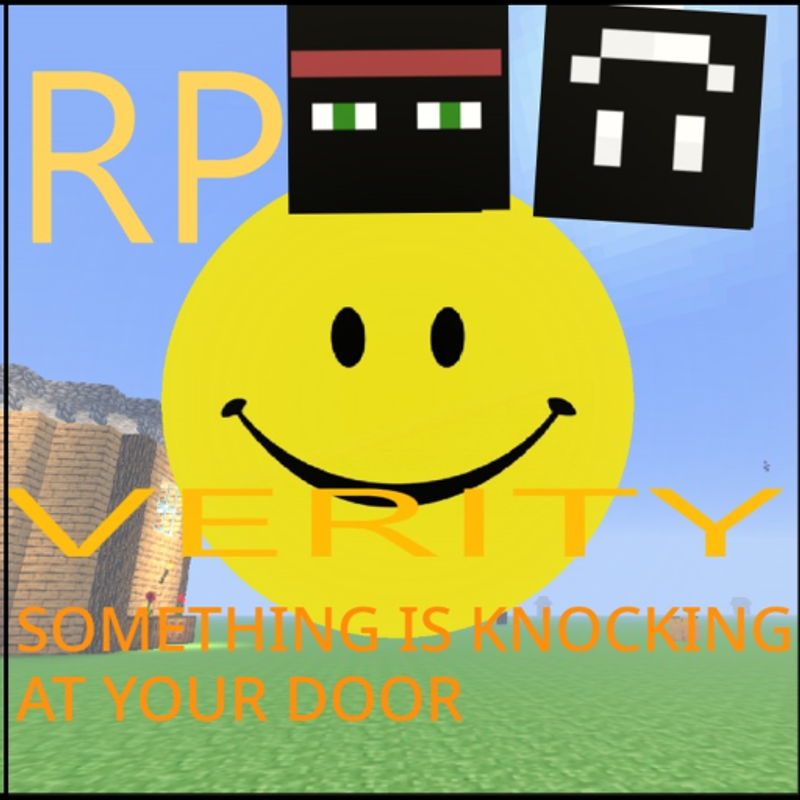
Morphing is the core mechanic of SIKAYD: VERITY RP. Instead of customizing a blocky avatar skin, you replace your character with a full Verity, ThatMob, or Twixxel model and roleplay from that silhouette. c00lzerRSolo’s experience (Place 127329525207941, Universe 10393707211, released 2026-06-25) keeps the loop simple: join, open the morph interface, pick a series character, explore the map with other players. There are no combat stats locking you into one choice, and most public servers allow mid-session swaps if you exit scenes politely.
This guide covers menu flow, first morph timing, swap etiquette, troubleshooting, and how the planned UI rework may change labels. Pair it with Getting Started for day-one context and Morphs Hub for personality depth on each morph.
Before you morph
Confirm three basics:
- You are in the official experience by c00lzerRSolo
- You can move and chat — read PC Controls or Mobile Controls if not
- You know which morph fits your session — see Morph Tier List for RP versatility notes after the July 2026 lookout tower + lighting update
Morphing at spawn is normal. Take ten seconds to look at the menu instead of blocking walkways while AFK.
Opening the morph menu
Exact button names can shift between patches, but the pattern is consistent across Roblox morph RP games:
- Look for a Morphs, Characters, or Roles button on the side or top bar
- On mobile, the same entry often lives in a hamburger menu or floating icon
- Some builds spawn you already morphed; open the menu anyway to confirm your model
If the planned UI rework moves buttons, check Updates Hub the same week and revisit this section — we update paths after verified shutdown patches.
Selecting Verity, ThatMob, or Twixxel
The launch roster centers on three series morphs:
| Morph | Model identity | When to pick | Deep guide |
|---|---|---|---|
| Verity | Yellow smiling sphere | Versatile scenes, companion horror, tours | Verity Morph Guide |
| ThatMob | Creator-aligned anchor | Hosting groups, calm lore framing | ThatMob Morph Guide |
| Twixxel | Partner energy | Duo banter with Verity, reactive RP | Twixxel Morph Guide |
Tap or click your choice and wait for the model swap. Roblox may hitch for a second while assets load — that is normal on low-end devices.
Future skins may add variants (color swaps, accessories). Treat them as cosmetic unless patch notes say otherwise. Track Codes Hub for promos; no active codes exist as of July 2026.
First morph best practices
- Face outward from spawn so your model loads without trapping others
- Read your morph silhouette — partners identify you visually before chat
- Set tone early with one greeting line (helper Verity vs quiet Twixxel)
- Avoid duplicate bits — if three Verity players spam the same joke, switch morphs for variety
Watch How to Roleplay before using horror emotes on strangers.
Mid-session morph swaps
Swapping is allowed on most public servers, but scene courtesy matters:
- Finish or pause your current scene OOC (“switching morph, brb”)
- Open the morph menu away from narrow paths and tower edges
- Select the new morph and wait for load
- Re-introduce yourself briefly so partners update their mental cast
Do not swap mid-sentence during another player’s emotional beat — it reads as trolling. If you must leave entirely, say OOC goodbye instead of vanishing silently.
Morphing for map features
The July 27, 2026 lookout tower rewards morphs with strong silhouettes. Verity reads from ground to platform; ThatMob hosts briefings upstairs; Twixxel plays below for split sightlines. Lookout Tower Guide and Map Guide suggest staging spots that match your model height and emotes.
Improved lighting helps night screenshots — hold still emotes, count down OOC, then resume RP.
Troubleshooting common issues
| Problem | Likely cause | Fix |
|---|---|---|
| Menu will not open | UI glitch or patch mid-deploy | Rejoin server after shutdown updates |
| Stuck default avatar | Morph failed to apply | Re-select morph; check connection |
| Wrong model shows | Lagged swap | Wait five seconds before moving |
| Invisible hitbox | Roblox physics edge case | Reset character or rejoin |
| Missing morph option | Server not updated | Try another server post-patch |
Persistent failures after a Shutdown = Update window usually mean your client needs a fresh join — not a fake code from social media.
Expression today vs roadmap
Voicelines and open-mouth Verity are future features. Until they ship:
- Use chat with short, readable lines
- Use emotes for nods, spins, and idle menace — avoid spam
- Adjust horror pacing manually; audio will not carry tone for you yet
When voicelines arrive, expect crowded lobbies to revisit volume etiquette. This page will note menu changes alongside Updates Hub entries.
Morph etiquette checklist
- Do not block spawn while browsing the menu
- Do not claim admin powers because your morph looks official
- Do not force partners into scenes after a morph swap without re-consent
- Do link curious players to Getting Started and Morphs Hub
Related pages
- Getting Started — first session overview
- Verity Morph Guide — Verity personality and horror consent
- ThatMob Morph Guide — hosting frameworks
- Twixxel Morph Guide — duo dynamics
- How to Roleplay — scene tone and boundaries
- Morph Tier List — comparative RP strengths
Morphing is one click, but how you introduce the model defines the session. Pick intentionally, swap politely, and let the map — especially the new tower — give your character a stage.
Frequently Asked Questions
Quick answers for SIKAYD: VERITY RP players.
Can I change morphs without rejoining the game?
Most public servers allow mid-session swaps through the morph menu. Exit scenes politely OOC first so partners are not confused.
Why do I not see a fourth morph option?
The core roster is Verity, ThatMob, and Twixxel at launch. Future skin updates may add variants; watch Updates Hub for patch notes.
Does morph choice affect speed or jump height?
No combat stat differences define the experience. Movement follows standard Roblox controls documented on PC and Mobile Controls pages.
Will the UI rework break this guide?
Button labels may move, but morph RP flow stays similar. We update this page after verified shutdown patches from c00lzerRSolo.
Where should I morph for group photos after the July update?
The lookout tower platform offers clean sightlines and improved lighting. See Lookout Tower Guide for safe staging and rail etiquette.